Tbeam - Ant Design Vue 3.x 新增 项目
抽屉式新增
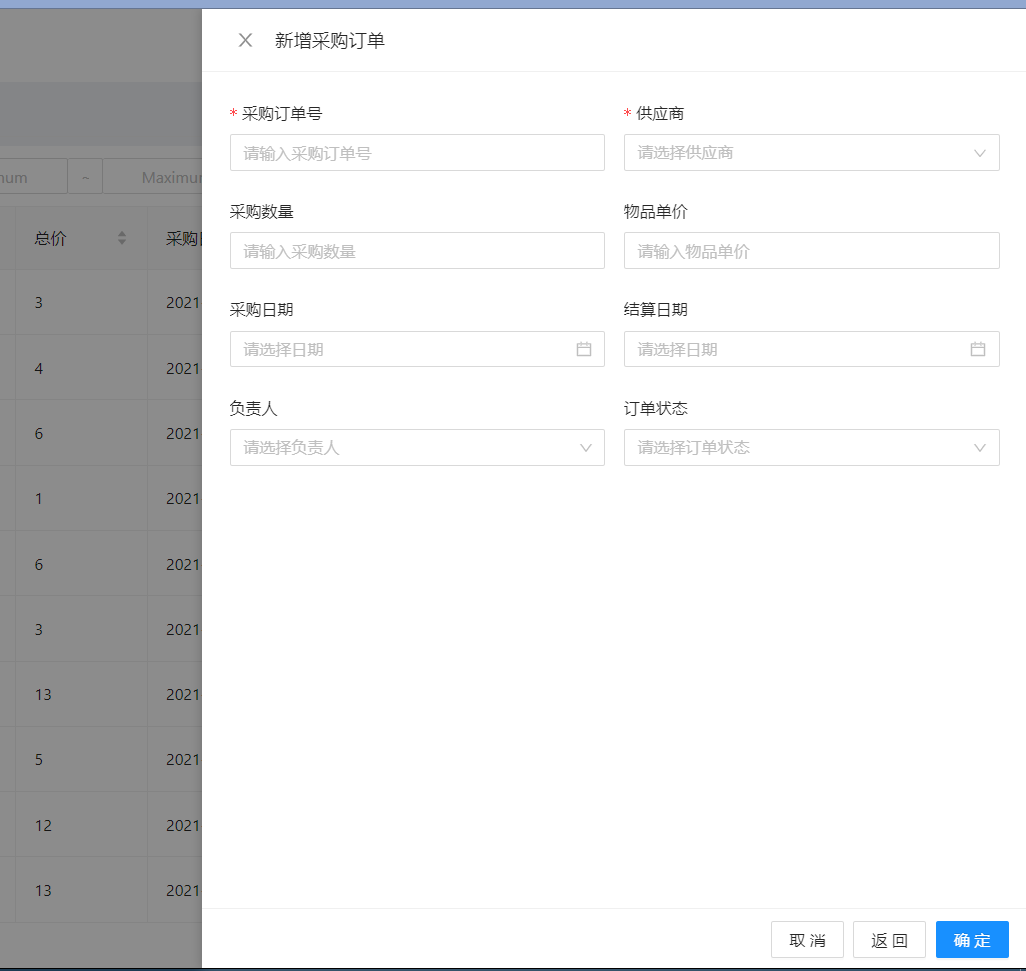
新增界面原本我是想用弹窗式窗口来做,但是经过讨论,还是决定用抽屉来做。(PS:主要有现成的组件😄)
直接附上部分代码
<template>
  <a-space size="middle">
    <!-- 新增按钮 -->
    <a-button type="primary" style="margin: 10px" @click="onAddOrder">
      <PlusOutlined />新增采购订单
    </a-button>

    <a-drawer
      title="新增采购订单"
      :width="720"
      :visible="addVisible"
      :body-style="{ paddingBottom: '80px' }"
      :footer-style="{ textAlign: 'right' }"
      @close="onAddClose"
      :maskClosable="false"
    >
      <a-form :model="addForm" :rules="addRules" layout="vertical">
        <a-row :gutter="16">
          <a-col :span="12">
            <a-form-item label="采购订单号" name="id" has-feedback>
              <a-input
                v-model:value="addForm.id"
                placeholder="请输入采购订单号"
                autocomplete="off"
              />
            </a-form-item>
          </a-col>
          <a-col :span="12">
            <a-form-item label="供应商" name="supplier">
              <a-select
                v-model:value="addForm.supplier"
                placeholder="请选择供应商"
                :options="supplierNameList"
              ></a-select>
            </a-form-item>
          </a-col>
        </a-row>
        <a-row :gutter="16">
          <a-col :span="12">
            <a-form-item label="采购日期" name="buyTime">
              <a-date-picker
                v-model:value="addForm.buyTime"
                style="width: 100%"
                :get-popup-container="(trigger) => trigger.parentNode"
              />
            </a-form-item>
          </a-col>
          <a-col :span="12">
            <a-form-item label="结算日期" name="settleTime">
              <a-date-picker
                v-model:value="addForm.settleTime"
                style="width: 100%"
                :get-popup-container="(trigger) => trigger.parentNode"
              />
            </a-form-item>
          </a-col>
        </a-row>
          <a-col :span="12">
            <a-form-item label="订单状态" name="status">
              <a-select
                v-model:value="addForm.status"
                placeholder="请选择订单状态"
              >
                <a-select-option value="1">未审核</a-select-option>
                <a-select-option value="2">未采购</a-select-option>
                <a-select-option value="3">采购中</a-select-option>
                <a-select-option value="4">已采购</a-select-option>
              </a-select>
            </a-form-item>
          </a-col>
        </a-row>
      </a-form>
      <template #footer>
        <a-button style="margin-right: 8px" @click="onAddClose"
          >取消</a-button
        >
        <a-button style="margin-right: 8px" @click="onAddBack"
          >返回</a-button
        >
        <a-button type="primary" @click="onAddSure">确定</a-button>
      </template>
    </a-drawer>
  </a-spin>
</template>

<script lang='ts'>
import {
  getCurrentInstance,
  defineComponent,
  ref,
  toRefs,
  reactive,
  onMounted,
  UnwrapRef,
} from "vue";

import { message, Modal } from "ant-design-vue";
import { PlusOutlined } from "@ant-design/icons-vue";
import dayjs from "../../config/dayjs_zh_cn";
import IconFont from "../../config/iconfont";
import { cloneDeep } from "lodash-es";
import { PurOrderType } from "../../assets/types/purchase/order";
import { SupplierType } from "../../assets/types/purchase/supplier";


// 表格表头
const columns = [
  {
    title: "采购单号",
    dataIndex: "id",
  },
  {
    title: "供应商",
    dataIndex: "supplier",
  },
  {
    title: "采购数量",
    dataIndex: "count",
    sorter: (a: PurOrderType, b: PurOrderType) => a.count - b.count,
  },
  {
    title: "单价",
    dataIndex: "price",
    sorter: (a: PurOrderType, b: PurOrderType) => a.price - b.price,
  },
  {
    title: "总价",
    dataIndex: "total",
    sorter: (a: PurOrderType, b: PurOrderType) => a.total - b.total,
  },
  {
    title: "采购日期",
    dataIndex: "buyTime",
    sorter: (a: PurOrderType, b: PurOrderType) => a.buyTime - b.buyTime,
  },
  {
    title: "结算日期",
    dataIndex: "settleTime",
    sorter: (a: PurOrderType, b: PurOrderType) => a.settleTime - b.settleTime,
  },
  {
    title: "负责人",
    dataIndex: "leader",
  },
  {
    title: "订单状态",
    dataIndex: "status",
  },
  {
    title: "操作",
    dataIndex: "operate",
    width: 155,
  },
];

export default defineComponent({
  name: "PurchaseOrder",
  components: {
    // 引入自定义图标
    IconFont,
    PlusOutlined,
  },
  setup() {
    // axios请求
    const $http = getCurrentInstance().appContext.config.globalProperties.$http;
    // 判断加载
    const loading = ref<boolean>(false);
    // reactive统一管理的数据
    const state = reactive({
      tableDataList: [], // 必须响应式
      supplierNameList: [], // 如果优化,需要转为普通数组,因为无序修改,则无需响应式
      searchTitle: [], // 同理,响应式消耗性能,不一定为响应式
      selectedRowKeys: [],
    });

    // 初始化数据
    const initData = () => {
      loading.value = true;
      initSupplier();
      initSearchTitle();
      initTable();
      loading.value = false;
      message.success("数据加载成功");
    };

    // 加载表格数据
    const initTable = () => {
      $http.get("/purchase/order/orderList").then((res: any) => {
        state.tableDataList = res.data;
      });
    };
    // 初始化供应商
    const initSupplier = () => {
      $http.get("/purchase/order/supplierList").then((res: any) => {
        // 后期如果接口返回的是供应商名字,则去掉下面代码
        res.data.map((item: SupplierType) => {
          state.supplierNameList.push(
            Object.assign({}, {}, { value: item.name, label: item.name })
          );
        });
      });
    };

    const addForm = reactive<PurOrderType>({
      id: undefined,
      supplier: undefined,
      count: undefined,
      price: undefined,
      total: undefined,
      buyTime: undefined,
      settleTime: undefined,
      leader: undefined,
      status: undefined,
    });
    const addRules = {
      id: [{ type: "string", required: true, message: "必须输入采购订单号" }],
      supplier: [{ required: true, message: "请选择一位供应商" }],
      count: [{ type: "number", message: "只能是数字哦~~" }],
      price: [{ type: "number", message: "只能是数字哦~~" }],
    };

    const addVisible = ref<boolean>(false);
    // 打开新增采购订单界面
    const onAddOrder = () => {
      addVisible.value = true;
    };
    // 关闭新增界面,并清空内容
    const onAddClose = () => {
      Object.keys(addForm).map(key => {
        addForm[key] = undefined;
      })
      addVisible.value = false;
    };
    // 仅仅关闭新增界面
    const onAddBack = () => {
      addVisible.value = false;
    }

    const onAddSure = () => {
      let buyTime = '';
      let settleTime = '';
      if(addForm.buyTime || addForm.settleTime){
        buyTime = dayjs(addForm.buyTime).format('YYYY-MM-DD');
        settleTime = dayjs(addForm.settleTime).format('YYYY-MM-DD');
      }
      const newAddData = Object.assign({},addForm,{ buyTime,settleTime});
      state.tableDataList.unshift(newAddData);

      onAddClose();
    }

    // 组件挂载页面后的回调,生命函数
    onMounted(() => {
      initData();
    });

    return {
      // 数据
      ...toRefs(state),
      columns,
      loading,
      addForm,
      addRules,
      // 函数
      // 表上方的工具栏 回调函数
      addVisible,
      onAddOrder,
      onAddClose,
      onAddBack,
      onAddSure,
    };
  },
});
</script>

<style lang='less'>
</style>因为官方直接有例子,copy 过来,直接改成自己需要的名字即可。
效果如图:
当然没那么简单。
问题 1
我相信日期的格式一直都是表单的一个难点,我现在也遇到了,就是转换格式问题,官方默认是标准的国际日期格式,即带有英文。我需要格式化为 YYYY-MM-DD。
我是用了 day.js 库来进行格式化
引入:
import dayjs from "../../config/dayjs_zh_cn";由代码看出引入的是上两级目录的一个 js 文件,内容为:
import "dayjs/locale/zh-cn";
import dayjs from "dayjs";

dayjs.locale("zh-cn");

export default dayjs;不难看出,这里才是引入 day.js 库的文件。这个文件把官方默认的国际格式改为中国格式,并导出。
接着在按下确定的时候,获取表单的数据,我是放在 addForm 里,使用 v-model 进行同步数据
const onAddSure = () => {
  let buyTime = "";
  let settleTime = "";
  // 进行日期的格式:YYYY-MM-DD
  if (addForm.buyTime || addForm.settleTime) {
    buyTime = dayjs(addForm.buyTime).format("YYYY-MM-DD");
    settleTime = dayjs(addForm.settleTime).format("YYYY-MM-DD");
  }
  // 深克隆一个新的对象
  const newAddData = Object.assign({}, addForm, { buyTime, settleTime });
  state.tableDataList.unshift(newAddData); // 新数据添加到第一行,更新页面

  onAddClose();
};这需求困扰我很久,才写出这段简单的代码💯。他是点击保存的回调函数,是打算将添加的数据更新到表格里
- 但是出现了一些问题,我原本想把
addForm的两个日期取出来,进行格式化然后重新赋值覆盖掉原来的,接着利用Object.assign()进行合并新的对象,然后添加到表格的第一行,更新页面 - 但是控制台报错了,我也不知道如何解决,我大概猜到
addForm的日期不允许进行替换,于是我就新建了另一个变量newAddData,合并了addForm的值,并修改日期的格式,于是这样成功了,就是上方的代码
提示
晚上回来后再次测试,竟然发现前面报错的代码成功了,真是有点莫名其妙,哈哈~~~
代码:(就是上方说的报错的代码,晚上回来测试后竟然成功了)
const onAddSure = () => {
  addForm.buyTime = dayjs(addForm.buyTime).format("YYYY-MM-DD");
  addForm.settleTime = dayjs(addForm.settleTime).format("YYYY-MM-DD");
  const newAddData = Object.assign({}, addForm);
  state.tableDataList.unshift(newAddData);
  onAddClose();
};问题 2
其实在解决问题 1 的报错后,我发现了一个新的问题,这个问题我相信很多人都会遇到。那就是深克隆和浅克隆。
深克隆:复制了一份一模一样的数据,虽然双方拥有一样的数据,但是彼此互不干扰
浅克隆:拿了对方一份数据,双方共享一份数据,任意一方修改,双方看到的数据就是修改后的数据
如上方代码所示,我为什么不直接在第五行代码添加 addForm 呢,即
const onAddSure = () => {
  addForm.buyTime = dayjs(addForm.buyTime).format("YYYY-MM-DD");
  addForm.settleTime = dayjs(addForm.settleTime).format("YYYY-MM-DD");
  state.tableDataList.unshift(addForm);
  onAddClose();
};因为添加的 addForm 是浅克隆添加,意思是当 addForm 的数据发生改变了,添加的数据也会随机改变,他们共用一套数据,所以我必须把这份数据深克隆给另一个变量,然后添加该变量。
为什么我会意识到呢?因为 onAddClose() 困扰我了挺久,看下代码:
// 关闭新增界面,并清空内容的回调
const onAddClose = () => {
  Object.keys(addForm).map((key) => {
    addForm[key] = undefined;
  });
  addVisible.value = false;
};注意到了吗?这个函数里我把 addForm 的数据全部清空了,如果 tableDataList 添加的是 addForm,当清空了 addForm,就相当于白添加了空数据。
如图所示:添加了数据,最后却是空
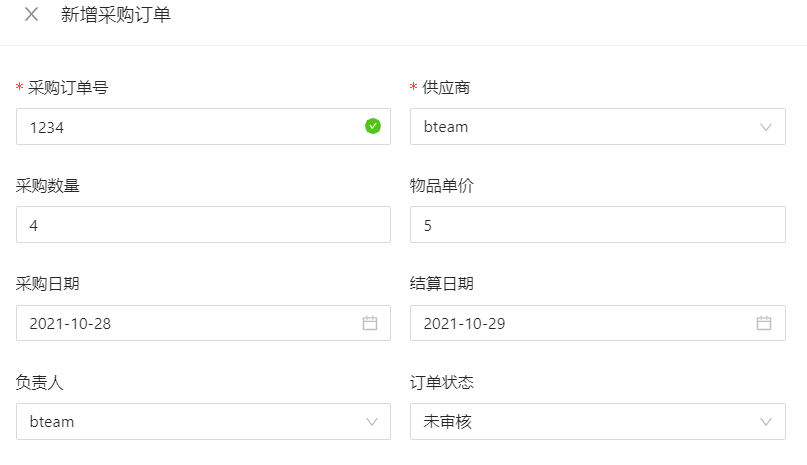

因为清除了 addForm,等于清除了表格数据,所以需要深克隆给新变量,由新变量代替addForm加到表格。
其实问题 2 是我在设计供应商的添加界面时遇到的,因为订单的已经采用了报错后调式出来的代码,天生深克隆了一份。
晚上回来还原问题 1 出现的代码,没想到报错的代码成功了。哈哈哈哈~~~~ 😄
晚安
现在是 2021-10-28 01:41:29,先洗冷水,然后睡觉咯
更新
后续更新
需求:把新增界面封装到一个组件中
2021-11-07 @Young Kbt
因为考虑到维护性和可读性,所以需要进行封装,而进行封装的过程,要考虑事件的触发,以及数据的传递等因素。
创建一个 WarehouseAdd.vue 组件,把新增相关的代码放入其中,原代码则为:
<!-- 新增界面 -->
<a-drawer
  title="新增供应商"
  :width="720"
  :visible="addVisible"
  :body-style="{ paddingBottom: '80px' }"
  :footer-style="{ textAlign: 'right' }"
  @close="onAddClose"
  :maskClosable="false"
>
    <WarehouseAdd
                  ref="warehouseAddRef"
                  @onSure="onSubmitForm"
                  :sourceLabels="sourceLabels"
                  />
    <template #footer>
<a-button style="margin-right: 8px" @click="onAddBack">返回</a-button>
<a-button type="primary" @click="onAddSure">确定</a-button>
    </template>
</a-drawer>其中 <WarehouseAdd/> 子组件则放新增的代码。
流程之确定
当父组件点击确定按钮(18 行代码)时,需要调用子组件的某个函数,该函数里,子组件会把新增表单传递给父组件。
onSubmitForm 是父组件传递给子组件的函数,子组件通过该函数把新增的表单传递给父组件
// 父组件:addForm 是子组件传递过来的新增表单
const onSubmitForm = (addForm) => {
  // ......
};warehouseAddRef 是子组件标签,当点击确定按钮(18 行代码)时候,触发 onAddSure 函数,该函数就会主动触发子组件的 submitProdoce 函数
// 父组件:确定新增的回调
const onAddSure = () => {
  // warehouseAddRef 是 ref,所以需要 .value
  warehouseAddRef.value.submitProdoce();
};submitProdoce 函数是子组件的一个函数,这个函数如果被调用,则内部触发 onSure 事件,该事件绑定父组件的 onSubmitForm 函数,把新增表单传递给父组件
// WarehouseAdd 子组件:提交表单的回调,由父组件调用
const submitProdoce = () => {
  // ......
  emit("onSure", addForm); // onSure是一个触发事件,该事件绑定了 onSubmitForm
  // ......
};流程之关闭
和确认同理,当点击关闭(第 8 行代码),触发 onAddClose 函数, 该函数通过子组件标签调用子组件的某个函数,这个函数自动清除表单数据
//父组件:关闭新增界面,并清空内容
const onAddClose = () => {
  warehouseAddRef.value.onAddClose();
  // 关闭抽屉
  addVisible.value = false;
};

//子组件:关闭新增界面,并清空内容,初始化默认行为
const onAddClose = () => {
  Object.keys(addForm).map((key) => {
    Object.keys(sourceForm).map((key) => {
      sourceForm[key] = undefined;
    });
  });
};点击查看新增源码
<template>
  <!-- 默认展开1 -->
  <a-collapse v-model:activeKey="activeKey">
    <a-collapse-panel key="1" header="物品入库表单">
      <a-form :model="addForm" :rules="addRules" layout="vertical">
        <a-row :gutter="16">
          <a-col :span="12">
            <a-form-item label="物品编号" name="id" has-feedback>
              <a-input
                v-model:value="addForm.id"
                placeholder="请输入物品编号"
                autocomplete="off"
              />
            </a-form-item>
          </a-col>
          <a-col :span="12">
            <a-form-item label="物品名称" name="name">
              <a-input
                v-model:value="addForm.name"
                placeholder="请新增物品名称"
                autocomplete="off"
              />
            </a-form-item>
          </a-col>
        </a-row>
        <a-row :gutter="16">
          <a-col :span="12">
            <a-form-item label="型号规格" name="type" has-feedback>
              <a-input
                v-model:value="addForm.type"
                placeholder="请输入型号规格"
                autocomplete="off"
                style="width: 100%"
              />
            </a-form-item>
          </a-col>
        </a-row>
        <a-row :gutter="16">
          <a-col :span="12">
            <a-form-item label="库存" name="num">
              <a-input-number
                v-model:value="addForm.num"
                placeholder="请新增库存"
                style="width: 100%"
              />
            </a-form-item>
          </a-col>
          <a-col :span="12">
            <a-form-item label="单位" name="unit">
              <a-select v-model:value="addForm.status" placeholder="请选择单位">
                <a-select-option value="个">个</a-select-option>
                <a-select-option value="件">件</a-select-option>
              </a-select>
            </a-form-item>
          </a-col>
        </a-row>
        <a-row :gutter="16">
          <a-col :span="12">
            <a-form-item label="销量" name="sale">
              <a-input-number
                v-model:value="addForm.sale"
                placeholder="请新增销量"
                style="width: 100%"
              />
            </a-form-item>
          </a-col>
          <a-col :span="12">
            <a-form-item label="单价" name="price" has-feedback>
              <a-input-number
                v-model:value="addForm.price"
                placeholder="请新增单价"
                style="width: 100%"
              />
            </a-form-item>
          </a-col>
        </a-row>
      </a-form>
    </a-collapse-panel>
    <a-collapse-panel key="2" header="物品来源表单">
      <a-form :model="sourceForm" :rules="sourceRules" layout="vertical">
        <a-row :gutter="16">
          <a-col :span="12">
            <a-form-item label="来源编号" name="sourceId" has-feedback>
              <a-input
                v-model:value="addForm.source.sourceId"
                placeholder="请输入来源编号"
                autocomplete="off"
              />
            </a-form-item>
          </a-col>
          <a-col :span="12">
            <a-form-item label="来源名称" name="sourceName">
              <a-cascader
                v-model:value="addForm.source.sourceName"
                :options="options"
                expand-trigger="hover"
                placeholder="请选择供应商"
              />
            </a-form-item>
          </a-col>
        </a-row>
        <a-row :gutter="16">
          <a-col :span="12">
            <a-form-item label="入库时间" name="stockTime" has-feedback>
              <a-date-picker
                v-model:value="addForm.source.stockTime"
                style="width: 100%"
                :get-popup-container="(trigger) => trigger.parentNode"
              />
            </a-form-item>
          </a-col>
          <a-col :span="12">
            <a-form-item label="物品状态" name="status">
              <a-select
                v-model:value="addForm.source.status"
                placeholder="请选择物品状态"
              >
                <a-select-option value="待售">待售</a-select-option>
                <a-select-option value="售空">售空</a-select-option>
              </a-select>
            </a-form-item>
          </a-col>
        </a-row>
      </a-form>
    </a-collapse-panel>
  </a-collapse>
</template>

<script lang="ts">
import { defineComponent, reactive, ref } from "vue";
import {
  ProduceType,
  ProduceSource,
} from "../../assets/types/purchase/warehouse";
import { PlusOutlined } from "@ant-design/icons-vue";
import dayjs from "../../config/dayjs_zh_cn";

interface Option {
  value: string;
  label: string;
  children?: Option[];
}

const options: Option[] = [
  {
    value: "供应商",
    label: "供应商",
    children: [
      {
        value: "bteam",
        label: "bteam",
      },
      {
        value: "kbt",
        label: "kbt",
      },
    ],
  },
  {
    value: "自生产",
    label: "自生产",
    children: [
      {
        value: "工厂一号",
        label: "工厂一号",
      },
      {
        value: "工厂二号",
        label: "工厂二号",
      },
      {
        value: "工厂三号",
        label: "工厂三号",
      },
    ],
  },
];
export default defineComponent({
  name: "WarehouseAdd",
  components: {
    PlusOutlined,
  },
  emits: ["onSure"],
  props: {
    sourceLabels: Array,
  },
  setup(props, { emit }) {
    // 获取父组件传来的物品明细Label
    const { sourceLabels } = props;
    // 隐藏框的key
    const activeKey = ref(["1"]);

    const displayRender = ({ labels }: { labels: string[] }) => {
      return labels[labels.length - 1];
    };
    // 物品来源表单
    const sourceForm = reactive<ProduceSource>({
      sourceId: undefined,
      sourceName: undefined,
      stockTime: undefined,
      status: undefined,
      remarks: undefined,
    });
    // 物品入库表单
    const addForm = reactive<ProduceType>({
      id: undefined,
      name: undefined,
      type: undefined,
      price: undefined,
      num: undefined,
      unit: undefined,
      sale: undefined,
      totalPrice: undefined,
      status: undefined,
      source: sourceForm,
    });
    // 物品入库表单效验规则
    const addRules = {
      id: [{ type: "string", required: true, message: "必须输入采购订单号" }],
      name: [{ required: true, message: "请选择一位供应商" }],
      num: [{ type: "number", message: "只能是数字哦~~" }],
    };
    // 物品来源表单效验规则
    const sourceRules = {
      sourceId: [
        { type: "string", required: true, message: "必须输入采购订单号" },
      ],
    };
    // 提交表单的回调,由父组件调用
    const submitProdoce = () => {
      if (addForm.id == undefined) {
        emit("onSure", false);
      } else {
        addForm.source.stockTime = dayjs(addForm.source.stockTime).format(
          "YYYY-MM-DD"
        );
        addForm.source.sourceName =
          addForm.source.sourceName[0] + "-" + addForm.source.sourceName[1];
        emit("onSure", true, addForm);
      }
    };

    // 关闭新增界面,并清空内容,初始化默认行为
    const onAddClose = () => {
      Object.keys(addForm).map((key) => {
        if (key != "source") {
          addForm[key] = undefined;
        } else {
          Object.keys(sourceForm).map((key) => {
            sourceForm[key] = undefined;
          });
        }
      });
      activeKey.value = ["1"];
    };

    return {
      // 数据
      options,
      activeKey,
      sourceLabels,
      sourceForm,
      addForm,
      addRules,
      sourceRules,
      // 函数
      displayRender,
      submitProdoce,
      onAddClose,
    };
  },
});
</script>

<style lang="less"></style>